Showing 3D models online, created by LeoCAD...
 edge
edgeWould be great to export 3D models from LeoCAD and show them on online platform(s).
I did investigate already some different online platforms and SketchFab seems to be best for now.
So let's test a relative big LeoCAD building: Mobaco construction toy library (v1.5), instruction Set 5-C:
- Containing 1004 parts
- Including 1 textured part (PNG), no transparency
- .LDR file size = 52 KB
While exporting the model, the next features are evaluated:
- Right orientation, like building in LeoCAD.
- Colors of 'solid parts' match LeoCAD.
- Both transparent & none-transparent textures (.png) could be used.
Tables below showing the 'source' format (exported or converted) and the results on different platforms.
Test platforms used:
- Windows 10 application: 3D Builder
- Windows 10 application: POV-Ray 3.7.0
- Online platform: SketchFab.com
A small remark on the LeoCAD parts library (v1.5) used:
- Using custom library, no Lego like parts and no geometry nesting.
- Parts used, could have one pre-defined color. In that case the part-model-color (grey) is neglected.
- Some parts may have - optional transparent - textures (PNG), orientated in 1 direction only.
(Not using colored meshes.) - Library parts are scaled, so they will work well with the fixed LeoCAD snapping tooling.
(Since the different toy-libraries, also scaling differs between those libraries...)
Exporting from LeoCAD:
LeoCAD provides some different ways for exporting. Let's see what will happen.
Exporting the same LeoCAD model, could be done with 4 different 3D export formats (or 3 types of 'Bill of Materials' (BoM)):
| LeoCAD viewer: | File types: | File size: | LeoCAD: | Orientation: | Solid colors: | Textures: |
| LDraw format | .ldr / .mpd | 52 KB | LeoCAD 25.09 | LDraw coordinate system. | LDraw colors RGBA colors | PNG PNG transperant |
| LeoCAD export to: | File type(s): | File size: | Test platform: | Orientation: | Solid colors: | Textures****: |
| 3D Studio | .3ds | 3.05 MB | SketchFab: | Okay | Pale colors** | NO |
| Collada | .dae | 1.1 MB | SketchFab: (Blender) | Okay (?) | Pale colors** (?) | NO (yes?) |
| POV-Ray | .pov | 1.22 MB | POV-Ray: | Okay | All grey* | NO |
| Wavefront | .obj & .mtl | 10.9 MB | 3D Builder: SketchFab: (Blender) | Okay +90x axis*** (?) | Okay Pale colors** (?) | NO NO (yes?) |
| BrickLink | .xml | 5.53 KB | BoM (text) | - | - | - |
| CSV | .csv | 3.81 KB | BoM (text) | - | - | - |
| HTML | .html + .png | 87.3 KB | html page + 2x renders (png) | - | - | - |
* The POV-Ray standard export, requires model-part-color, instead of pre-defined part colors.
** Pale colors regarding the LeoCAD models. Might be caused by the same model-part-color issue, where the model-color generates a 2nd layer of grey tone on top of the pre-defined part color. Could be solved inside the SketchFab viewer, changing for every color the 'BaseColor=0.5'...
*** Changing default orientation is an easy fix inside the SketchFab '3D settings' environment.
**** It's unsure if the LeoCAD export options do or do not export textures at all.
Blender: Great render application, used by many people. I did not try. Blender could read the Collada or Wavefront exports from LeoCAD. (See instructions.) Then export these models to your favorite 'online' format.
Conclusions:
- So it's basically possible exporting 3D models directly from LeoCAD and show them within online viewers.
- Exporting textures:
- Not working for SketchFab.
- Does work for Blender, although I'm not sure what type of textures these are.
Online converters
Then there are online 3D file converters, like ImageToStl. So it's possible to move from one 3D format to another. These 3D models are checked with '3D Builder':
| Source: | Convert to: | File size: | Test platform: | Orientation: | Solid colors: | Textures: |
| .3ds (LeoCAD) | .glb (ImageToStl) | 1.95 MB | 3D Builder | +90x axis | Pale colors; needs some repairs. | NO |
| .dae (LeoCAD) | .glb (ImageToStl) | 4.85 MB | 3D Builder | Okay | Pale colors. | NO |
| .glb (custom) | .fxb (ImageToStl) | 4.55 MB | 3D Builder | Okay | WRONG* | ? |
* .glb→.fxb→SketchFab: Solids are only half colored. Might be caused by wrong implementation of custom GLB format and/or conversion to FXB and/or different FXB implementation on SketchFab...
Conclusion:
- Converting 3D format's could be handy for certain different platforms.
- Converting 3D format's, is also difficult, since all conversion should use the right file definitions.
- If the source does not containing any textures, the conversion will skip them too...
Convert LDraw model (.ldr) directly by code
Python scripts for exporting plain LeoCAD 3D models (.ldr) directly into desired 3D format:
| Source: | Code: | Convert to: | File size: | Test platform: | Orientation: | Solid colors: | Textures: |
| LeoCAD (.ldr) | Python + trimesh | .glb (custom) | 5.47 MB | 3D Builder: SketchFab: | Okay Okay | Okay Okay | YES YES |
| LeoCAD (.ldr) | Python | .pov (custom) | (n/a) | POV-Ray | Okay | Okay | 1 image per plane* |
* Very annoying: POV-Ray seems to support only one image per plane! What if there are many more?
Some more insights, using transparent textures (.png) with these different software platforms:
| Software: | 3D format: | Opaque mesh: | Bounding box: | Selection through hole: | Transparent pixel index: |
| LeoCAD | LDraw | Yes | Visible, when 'edge lines' are on. | No | Needs to be palet index=0 (!) |
| POV-Ray | .pov | Yes | Bounding box completely transparent. | n/a | Index doesn't matter |
| SketchFab | .glb (custom) | NO* | Bounding box & surfaces visible | n/a | Index doesn't matter (?) |
| 3D Builder | .glb (custom) | NO* | Bounding box & surfaces visible | No |
* Bit annoying: Somehow I'm not able to export transparent/opaque meshes, in case of transparent textures. So currently, the shape of the mesh should follow the transparent pixels.
Conclusions:
- While using custom code, also textures could be exported, which is an improvement above LeoCAD exporting.
- For using SketchFab with textures:
- SketchFab/3D Builder (.glb): needs shapes, with projected texture pixels.
- SketchFab/3D Builder (.glb): is showing mesh-colors, for transparent pixels.
Converting to POV-Ray (.pov)
Started with a Python script creating POV-Ray parts library (.inc) file. This contains all unique 3D part information colors & optional textures. A second script converted a 3D LeoCAD model directly, using the included parts library. The first use-case: creating better pictures then LeoCAD did work. Remaining issues':
- Textures: Multiple textures in the exact same plane do not show up. For some toy libraries this is a big issue.
- Model viewer: Although Fly-through/Fly-round screen-shots could be rendered, it's not possible to have direct control spinning a model around.
- Online viewer: POV-Ray files are not directly viewable for online applications.
So basically re-evaluated this use-case and selected a more web friendly version, specific for online 3D models: glTF format.
Converting to glTF (.glb)
Armed with Python & the amazing TriMesh library, it is possible to convert LeoCAD (.ldr) models directly into binary glTF format (.glb). The primary TriMesh use-case is bit different, but with some adjustments it's also possible creating great 3D models, having 'right' solid colors & multiple textures. And on top of that, this is a 'modern' file format, works also with many different applications & online platforms.
The script is reading a LeoCAD model and uses the corspondending LDraw library. From these sources, it's creating a self contained, efficient binair file, containing the same 3D model.
Summary exporting LeoCAD models:
Extended tests, now including different textures & different ways of coloring parts:
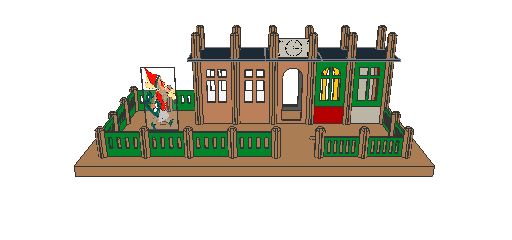
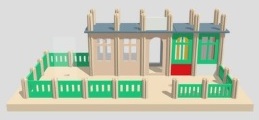
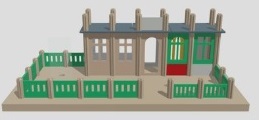
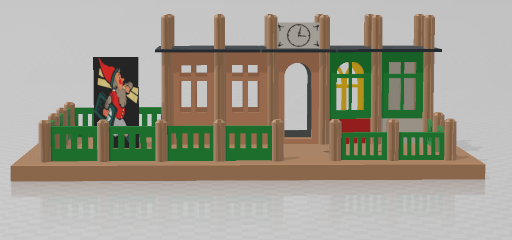
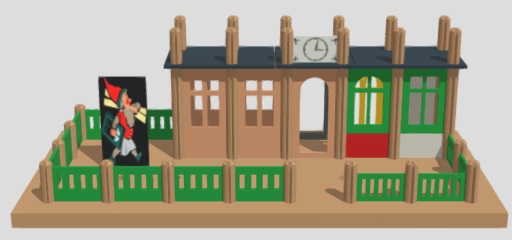
Direct exports from LeoCAD:
- Direct LeoCAD exports could be used on different (online) platforms.
- For SketchFab there are 3 export options: 3D Studio, Collada (.dae) & Wavefront.
- Color representation is different between LeoCAD and for instance SketchFab:
- LeoCAD is using RGB coloring + shading effects.
- SketchFab is using PBR textures, which stands for physically based rendering textures.
- Direct conversion resulting in 'pale color tones', regardless if model-part-colors or pre-defined-part-colors are used.
Within SketchFab, the colors could be adjusted by '3D settings'.
(Goto: 'material tab'-'BPR-maps'-'Base color factor = 0.5' and many more settings are possible.)
- It's unclear to me, if LeoCAD is able to export (.png) textures at all.
→ Working for sure, but not great for using (.png) textures.
Convert LDraw format by Blender:
- LeoCAD export (Collada/Wavefront) → Import with Blender → Export to your favorite 'online' file format.
→ The way to go. (Not sure if (.png) textures are working.)
Convert LDraw format by code (Python):
Writing some code:
- Python/TriMesh → .glb: Definitely more control (& challenges) generating a workable 3D model, including none-transparent textures and being interoperability.
- Python → .pov: Great for 2D rendering, which is the main POV-Ray use-case.
→ Not ideal, but works for me.
Different online platforms:
For using different online platforms, see a previous post.